

Retail executives, store planners, and commercial technology integrators constantly seek innovative ways to boost foot traffic, drive sales conversions, and elevate the in-store customer experience. While static posters and printed banners served store promotions well in the past, dynamic visual technologies now dominate the modern retail landscape. Consequently, store owners frequently ask commercial display experts a key financial question: “Beyond displaying loop-play brand advertisements, how can we deploy retail digital signage strategically, and which specific in-store placement yields the highest return on investment (ROI)?”
Installing commercial displays without a clear location strategy often leads to poor customer engagement and low sales impact. Placing a low-brightness consumer TV in a sunlit storefront window leads to washed-out images, while putting static ad loops near checkout lines misses prime impulse-buying opportunities. This comprehensive retail technology guide explores the value pyramid of digital displays, pinpoints high-ROI application scenarios, and provides practical display selection rules for store owners.
1. The Retail Digital Signage “Scene Value Pyramid”
To maximize the impact of commercial displays, retailers should deploy hardware based on customer touchpoints throughout the shopping journey.
Modern retail environments use digital signage solutions at different customer touchpoints to attract attention, improve engagement, and increase sales opportunities.
a. Storefront Windows: Capture Outdoor Foot Traffic
Solution: High-Brightness Window Displays
Retailers use high-brightness digital signage in storefront windows to attract customers from outside. These displays deliver clear visuals in daylight environments and help promote products, campaigns, and brand messages.
b. In-Store Aisles: Increase Product Engagement
Solution: Dynamic Promotional Displays and Video Walls
Digital signage in retail aisles helps shoppers discover promotions and product information. Dynamic videos and interactive content create stronger engagement compared with traditional static posters.
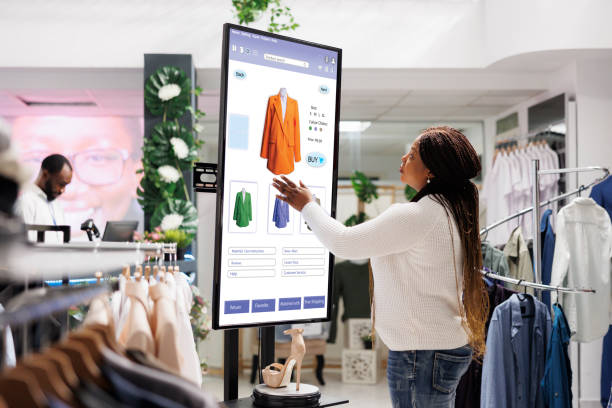
c. Interactive Kiosks: Enable Self-Service Shopping
Solution: Touchscreen Displays and Endless Aisle Systems
Interactive kiosks allow customers to browse products, check inventory, and access detailed information independently. They also extend product choices beyond physical shelf limitations.
d. Checkout Counters: Encourage Last-Minute Purchases
Solution: Point-of-Sale Digital Advertising Displays
Digital screens near checkout areas promote related products, special offers, and limited-time deals. These displays help retailers influence purchasing decisions during the final shopping stage.
2. Four High-Impact Retail Deployment Scenarios
Scenario 1: High-Brightness Storefront Window Signage (Attracting Foot Traffic)
The storefront window represents a retailer’s primary opportunity to capture pedestrian attention and draw shoppers inside. However, standard indoor commercial displays (typically 350 to 500 nits) fail in bright sunlight, rendering promotional graphics unreadable. Specialized window display signage requires ultra-high brightness panels rated between 2,500 and 5,000 nits to deliver crisp, vibrant imagery against direct sunlight glare. Furthermore, dual-sided displays allow store owners to present high-impact promotional videos to outdoor passersby while simultaneously displaying internal messaging to shoppers inside the store.
Scenario 2: In-Store Promotional Displays and Video Walls (Engaging Shoppers)
Once shoppers enter the store, strategic digital displays help guide customer traffic and highlight key promotions. Dynamic video content catches the human eye far more effectively than static cardboard signage. Retailers deploy high-definition commercial screens across end-cap displays and fashion aisles to highlight seasonal arrivals, display promotional discounts, and demonstrate product features in real time.
Scenario 3: Interactive Touch Kiosks and “Endless Aisle” Lookup (Self-Service)
Interactive commercial touch displays transform passive shoppers into active buyers. Customers use interactive wayfinding kiosks to check real-time stock levels, browse extended online color variants (the “endless aisle” concept), and register for loyalty rewards programs without waiting for store staff assistance. This self-service convenience reduces customer frustration during peak shopping hours.
Scenario 4: Checkout Counter Point-of-Sale Advertising (The Highest ROI Zone)
The checkout counter stands out as the single highest-ROI zone in retail digital signage deployments. While shoppers wait in line, their attention naturally focuses on nearby screens, creating an ideal window for targeted point-of-sale advertising. Industry studies show that checkout-line digital signage increases impulse purchases by up to 20%. Modern dual-screen POS terminals leverage this behavior by processing checkout transactions on the clerk’s primary screen while running targeted promotional offers, add-on product suggestions, and loyalty prompts on the customer-facing secondary screen.
Retail Display Hardware Selection Matrix
| Deployment Scenario | Target Objective | Recommended Screen Specs | Key ROI & Commercial Impact |
| Storefront Window Display | Converts street foot traffic into store visits | 2,500 – 5,000 nits ultra-bright; dual-sided options | Captures pedestrian attention in direct sunlight |
| In-Store Aisle Promos | Drives product discovery & brand engagement | 500 – 700 nits; 4K resolution; narrow bezels | Boosts sales lift for featured promotional items |
| Interactive Kiosks | Delivers product lookup & endless aisle options | Commercial touch screens; anti-glare tempered glass | Expands in-store inventory choices; cuts labor strain |
| Checkout POS Advertising | Triggers last-minute impulse item buys | Dual-screen POS terminals; customer-facing screens | Increases impulse item sales by up to 20% |
 3. Strategic Display Selection Protocol for Store Owners
Commercial buyers can maximize their display technology investments by following three practical selection rules:
-
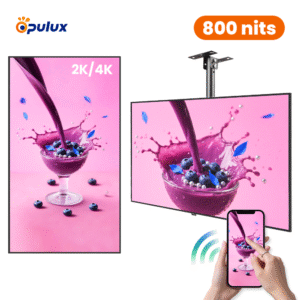
Calculate Viewing Distance Before Selecting Screen Size: Align screen size and resolution with viewer proximity. Use compact 10-inch to 15-inch customer-facing POS screens for close-up counter transactions, while installing 55-inch to 86-inch 4K commercial panels for high-impact aisle viewing.
-
Match Operating Brightness to Environmental Lighting: Avoid installing low-brightness displays near glass storefronts or under intense skylights. Specify ambient-light-sensing displays that adjust brightness automatically to save energy while maintaining visual clarity.
-
Prioritize Commercial-Grade Panels over Consumer TVs: Commercial displays feature durable components built for continuous 16/7 or 24/7 operation, integrated cooling systems, and specialized landscape/portrait mountings that standard home televisions lack.
Conclusion: Elevate In-Store Experiences with Targeted Display Strategies
In conclusion, implementing successful retail digital signage applications requires placing the right display hardware at key decision points along the customer shopping path.
Stop letting static posters fade in store windows or missing out on valuable impulse sales at checkout lines. Strategically deploying high-brightness window displays, interactive lookup kiosks, and dual-screen POS terminals allows retailers to capture passerby attention, streamline store operations, and unlock higher sales margins across every department. We manufacture every commercial display using premium grade-A panels, robust anti-glare glass, and high-reliability power units built to meet strict commercial standards. Contact our retail display solutions team today to review custom display options and request a tailored project proposal.