

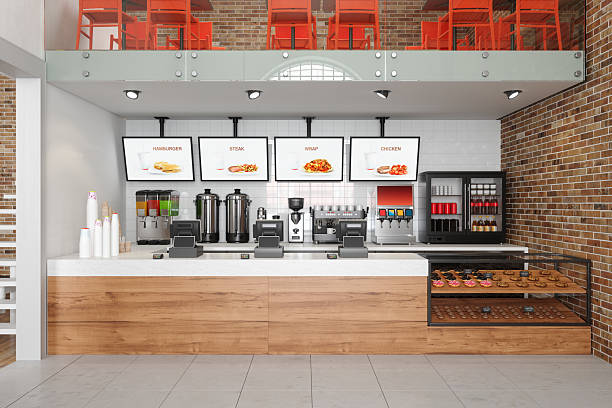
A digital menu screen is more than an electronic replacement for a printed menu board. For restaurants, quick-service restaurants (QSRs), cafés, and foodservice chains, it is a flexible merchandising tool that helps businesses manage product visibility, promote high-margin items, and adapt menu content to changing customer needs.
Unlike static menu boards, a dynamic digital menu board can display different products, prices, and promotions throughout the day. When combined with effective content planning and sales tracking, it helps restaurant operators make better use of their display space and improve the customer ordering experience.
The key is not simply installing a screen. It is developing a digital menu strategy that connects content scheduling, visual hierarchy, inventory management, and promotional goals.
1. What Makes a Digital Menu Screen Dynamic?
A static digital menu displays the same content repeatedly. A dynamic digital menu screen allows operators to adjust what customers see according to time, availability, and campaign priorities.
With a suitable content management system (CMS), restaurants can schedule updates in advance and manage multiple displays from a centralized platform.
Time-Based Menu Scheduling
Customer preferences and purchasing patterns change throughout the day. A digital menu screen can automatically display breakfast, lunch, dinner, and late-night menus according to a predefined schedule.
For example:
- Breakfast: Highlight coffee, breakfast sandwiches, and morning meal combinations.
- Lunch: Prioritize quick meal bundles, popular dishes, and convenient takeaway options.
- Dinner: Feature family meals, premium entrées, and shareable combinations.
- Off-peak periods: Promote selected beverages, desserts, or limited-time offers.
Time-based scheduling reduces the need for repeated manual updates and helps restaurants keep their menu content relevant to each service period.
Inventory-Based Menu Updates
Displaying unavailable products can frustrate customers and create unnecessary work for restaurant staff.
When integrated with a compatible point-of-sale (POS) or inventory system, a digital menu platform may support availability-based updates. Depending on the integration, unavailable items can be hidden, marked as sold out, or replaced with alternative recommendations.
This approach can help restaurants:
- Reduce customer disappointment caused by unavailable items.
- Keep displayed menu information consistent with actual availability.
- Reduce manual content adjustments during busy periods.
- Promote suitable alternatives when popular products run out.
However, inventory-driven updates require the appropriate software integration. A standalone digital menu screen does not automatically know which ingredients or dishes are unavailable.
Promotion Scheduling and Featured Products
Digital menu screens also allow operators to emphasize selected products during specific promotional periods.
Restaurants can use featured content to introduce new dishes, promote seasonal products, highlight combo deals, or communicate limited-time offers.
For multi-location restaurant chains, centralized content management can help maintain consistent campaign messaging while allowing approved local variations.
The result is a menu display that responds to business priorities rather than remaining a fixed graphic throughout the day.
2. How to Use the Golden Zone on a Digital Menu Screen
Customers rarely examine every menu item with equal attention. Screen layout, image quality, text size, viewing distance, and menu complexity influence how quickly they find relevant products.
For this reason, the visual hierarchy of a digital menu screen should support both customer navigation and promotional objectives.
Position High-Priority Items Strategically
The central or most visually prominent area of a menu layout can serve as a featured-product zone. However, there is no universal rule that the center always generates the highest sales. Viewing behavior varies with screen orientation, the number of panels, menu design, and customer position.
Instead of relying on placement alone, restaurant operators should test different layouts and compare sales results.
Consider these practical content strategies:
- Feature high-margin products: Give selected dishes greater visual prominence when they align with customer demand.
- Use appetizing food photography: Show realistic portions, recognizable ingredients, and appealing textures.
- Highlight combinations: Present main dishes alongside relevant drinks, sides, or desserts.
- Keep prices readable: Use consistent typography and clear price placement to support quick decisions.
- Use recommendation labels carefully: Tags such as “Popular Choice” or “Chef’s Recommendation” should reflect genuine product positioning.
Use Motion Without Distracting Customers
Digital menu screens support animation and video, but more motion does not necessarily mean better performance.
Subtle visual effects can attract attention to featured products, while excessive transitions and moving elements may make menus harder to read.
Effective content design should prioritize:
- Clear product names and pricing.
- High-quality, relevant food images.
- Consistent visual hierarchy.
- Readable content at the expected viewing distance.
- Controlled animation that does not interfere with ordering.
For restaurants with several menu panels, establish a consistent layout so customers can compare products quickly.
3. How Digital Menu Screens Can Support Restaurant Sales Growth
A well-planned digital menu strategy can support merchandising and operational improvements. Its commercial value depends on how effectively content, product selection, and customer behavior work together.
Increase Add-On and Combo Visibility
Customers may overlook side dishes, drinks, desserts, or upgrades when these items are difficult to notice on a printed menu.
A digital menu screen can display relevant add-ons alongside the main product or highlight a complete meal combination.
For example, a burger promotion might include a clearly presented meal upgrade with fries and a beverage. This makes the offer easier to understand and gives customers another purchasing option.
To evaluate the effect, track add-on attachment rates and average order value before and after the content change.
Give New Products More Exposure
New product launches often compete with familiar bestsellers for customer attention.
A featured digital menu panel can introduce a new dish through product photography, a short description, and a clear promotional message.
For a meaningful comparison, measure the promoted product’s sales volume against its previous performance or against a comparable period without the featured placement.
The results can help determine whether the promotion should continue, change position, or be replaced.
Improve Menu Adaptability Across Locations
Restaurant chains frequently manage different customer preferences, operating hours, and promotional calendars across multiple locations.
A centralized digital menu platform can simplify campaign deployment and reduce the workload associated with updating individual displays.
Depending on the software, operators may be able to manage:
- Menu content across multiple stores.
- Scheduled promotional campaigns.
- Approved local price and product variations.
- Screen status and content publishing.
- Different menu layouts for individual locations.
For growing restaurant groups, these capabilities can support more consistent brand presentation and more efficient menu operations.
4. How to Measure the ROI of a Digital Menu Screen
Installing a commercial digital menu display does not automatically increase sales. To understand its business value, operators should connect specific content changes with measurable outcomes.
A useful approach is to establish a baseline before launching a new menu strategy.
| Performance Metric | What It Measures | How to Use It |
|---|---|---|
| Item sales volume | Units sold for selected products | Compare promoted products before and after a campaign |
| Add-on attachment rate | Share of orders containing an add-on | Evaluate drinks, sides, desserts, and upgrades |
| Average order value | Average spending per transaction | Assess combo offers and upselling strategies |
| Gross profit per order | Profit generated by each transaction | Determine whether featured products support profitability |
| Order decision time | Time customers spend selecting products | Evaluate menu clarity and ordering efficiency |
| Content update time | Time required to publish menu changes | Assess operational benefits of centralized management |
A Practical Method for Testing Sales Impact
Step 1: Establish a baseline. Record sales for selected products over a representative period before changing the menu.
Step 2: Define one clear objective. For example, increase beverage attachment rates or improve the visibility of a newly launched dish.
Step 3: Change the content. Adjust the product position, imagery, promotional message, or scheduling while keeping other factors as consistent as possible.
Step 4: Compare the results. Review sales data across comparable days and service periods. Account for pricing, seasonality, foot traffic, and other promotions.
Step 5: Calculate profitability. Compare incremental gross profit with the cost of content production, software, hardware, and campaign management.
Where possible, compare similar stores or use controlled A/B tests to separate the effect of menu changes from other influences.
This process gives restaurant operators a more reliable basis for deciding which digital menu strategies deserve wider deployment.
5. What to Look for When Choosing a Commercial Digital Menu Screen
For B2B buyers, selecting the right display involves more than comparing screen sizes and purchase prices. The hardware, software, installation environment, and long-term management requirements must work together.
Display Performance and Readability
Evaluate screen size, resolution, brightness, viewing angle, and readability under the intended lighting conditions.
A menu screen installed in a bright storefront may require different brightness capabilities from one used in a controlled indoor dining area.
Content Management and Remote Updates
A suitable CMS should support the required content formats, scheduling functions, user permissions, and remote publishing workflow.
For restaurant chains, centralized management and location-based content control can be particularly valuable.
POS and Inventory Integration
If the goal is to synchronize displayed menus with product availability or pricing, confirm whether the platform supports the required POS, inventory, or ordering-system integrations.
Do not assume that every digital signage solution includes these functions by default.
Reliability and Installation Requirements
Assess operating hours, thermal management, mounting options, connectivity, maintenance access, and service support.
For commercial environments with extended operating schedules, the display should be selected according to the expected duty cycle and installation conditions.
Customization and Multi-Location Deployment
Restaurant equipment distributors, signage integrators, and chain operators may also need customized screen sizes, enclosure designs, branding, connectivity options, or software integration.
Working with a commercial display supplier that understands deployment requirements can simplify system specification and project planning.
6. Frequently Asked Questions About Digital Menu Screens
Q1. How is a digital menu screen different from a printed menu board?
A printed menu is generally static, while a digital menu screen can display scheduled promotions, videos, updated prices, and different menus throughout the day. With suitable software integration, it can also support inventory-based content updates.
Q2. Can I update digital menu screens remotely?
Yes. Many commercial digital signage systems support remote content management through a centralized CMS. Operators can publish menu changes and schedule campaigns across multiple locations, depending on the platform’s features and connectivity.
Q3. Can a digital menu screen increase restaurant sales?
It can support sales growth by improving product visibility, promoting relevant combinations, and adapting content to different service periods. Actual results depend on menu design, customer behavior, pricing, product margins, and execution. Measure performance using sales and profitability data rather than assuming a fixed percentage increase.
Q4. Where should high-margin items appear on a digital menu screen?
Place priority products in visually prominent areas that customers can identify quickly. The best position depends on screen layout, viewing behavior, and menu complexity. Test alternative placements and compare results to identify what works for each location.
Q5. Can digital menu screens automatically hide sold-out items?
This is possible when the content management platform integrates with a compatible POS or inventory system. Confirm the supported integration, update frequency, and fallback behavior with the supplier before deployment.
Q6. Are digital menu screens suitable for restaurant chains?
Yes. Centralized content management can help restaurant groups coordinate campaigns, schedule menus, and maintain consistent branding across locations. The required functions depend on the CMS, network architecture, and deployment scale.
Conclusion: Turn Your Digital Menu Screen into a Flexible Sales Tool
A successful digital menu screen strategy combines commercial display hardware, effective menu design, dynamic content scheduling, and measurable business objectives.
Rather than treating digital signage as a one-time hardware purchase, restaurant operators should use it as an adaptable part of their merchandising and customer communication strategy.
By highlighting relevant products, coordinating promotions with service periods, simplifying content updates, and measuring sales performance, businesses can make better use of their menu displays and identify opportunities for operational improvement.
At Opulux, we provide commercial digital menu screens, video wall solutions, and cloud-based content management options for restaurant chains, foodservice operators, and digital signage integrators.
Whether you are planning a single-store installation or a multi-location rollout, our team can help evaluate display specifications, content management requirements, and customized OEM/ODM solutions.



Comments are closed