
Commercial AV buyers, retail IT managers, and digital out-of-home (DOOH) network operators frequently encounter overlapping industry terms when specifying commercial screens. Among various hardware and software definitions, the distinction between a “digital signage system” and an “advertising display player” (often referred to in Asian commercial markets as an advertising machine or “digital signage player”) causes frequent confusion. Consequently, procurement teams and equipment buyers often ask commercial display specialists a fundamental question: “Are digital signage systems and advertising display players the same technology, or do key technical differences exist between them?”
Purchasing commercial display hardware without understanding the technical distinction between a standalone terminal and a networked ecosystem can lead to software incompatibility, limited scalability, and higher long-term maintenance costs. While both technologies deliver rich multimedia content to target audiences, an advertising display player refers primarily to the physical terminal hardware, whereas a digital signage system encompasses an end-to-end architecture comprising display hardware, media player nodes, and a centralized Content Management System (CMS). This technical guide breaks down the core relationship between these concepts, system architecture mechanics, comparison parameters, and procurement strategies for commercial LCD networks.
1. Conceptual Relationship: Terminal Hardware vs. System Ecosystem
To understand how these concepts interrelate, it helps to examine how the commercial display industry defines each term from a technical standpoint.
The Advertising Display Player as a “Fifth Media” Terminal
An advertising display player represents a dedicated commercial display unit engineered to broadcast multimedia content (فيديو, audio, graphics, and text) over a localized or networked setup. Historically recognized as the “Fifth Media” alongside TV, radio, print, and the internet, the term emphasizes the physical terminal hardware—including the high-brightness LCD panel, commercial-grade power supply, protective enclosure, and internal decoder board.
Digital Signage as an End-to-End Solution Architecture
In contrast, digital signage represents a broader system concept. It refers to a multi-tiered technical solution composed of three essential layers:
-
Display Terminals: The physical LCD panels, kiosks, or video walls.
-
Media Players & Hardware Encoders: Embedded or external computing units executing content playback.
-
Content Management System (CMS) & Analytics Backend: Cloud-based or on-premise software managing scheduling, real-time data integration, device telemetry, and dynamic audience targeting.
While an advertising display player is the endpoint, digital signage is the entire network ecosystem.
2. Technical Architecture: Standalone Playback vs. Dynamic Interactive Systems
Understanding the functional difference requires evaluating how content is managed, scheduled, and delivered across display hardware.
اللافتات الرقمية مقابل. Traditional Advertising Player Architecture
Modern digital signage systems use a connected architecture that differs from traditional standalone advertising players. While basic players rely on local storage, digital signage solutions use cloud management, network connectivity, and intelligent media processing.
| System Type | Content Source | Processing Method | Display Control |
|---|---|---|---|
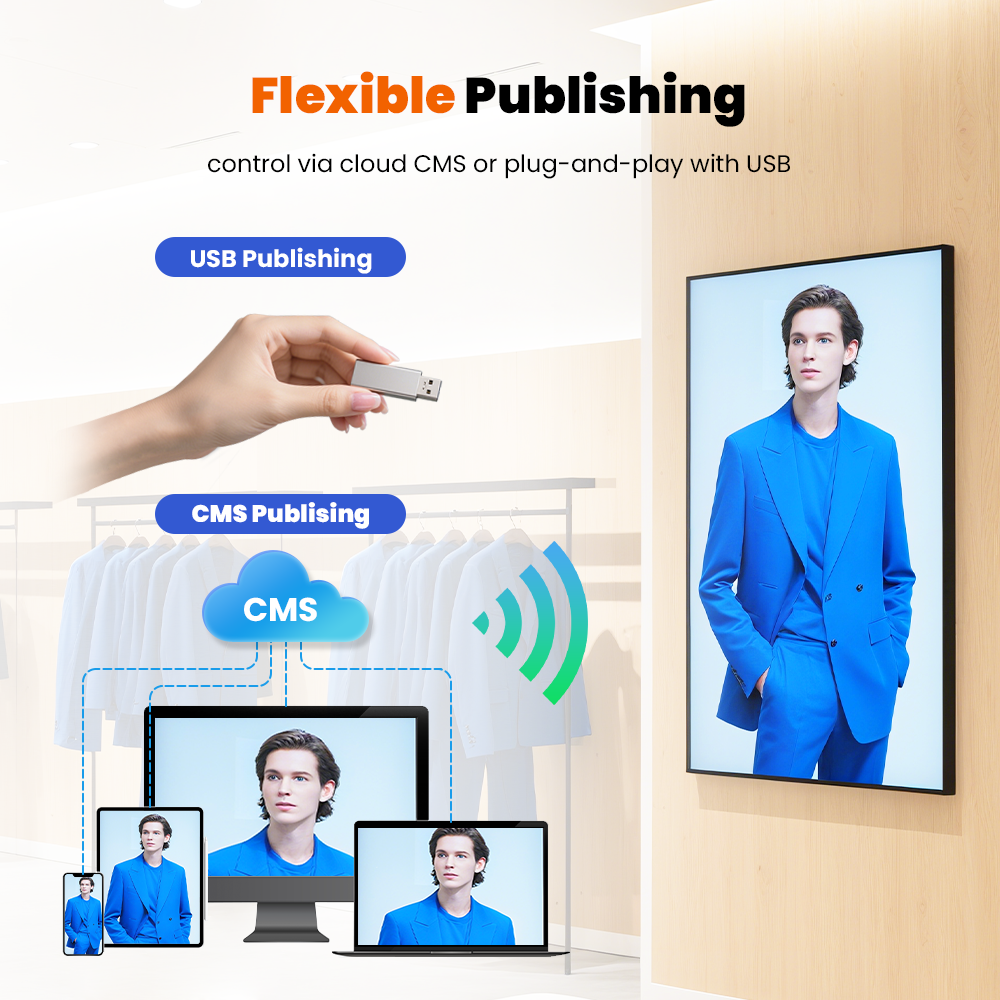
| Standalone Advertising Player | USB drive or SD card storage | Embedded decoder processes offline media filesThe | LCD panel displays fixed content |
| Digital Signage System | Cloud CMS platform or remote content server | SoC media player or networked player manages dynamic content | LCD updates real-time content remotely |
How Standalone Advertising Players Work
Traditional advertising players use local storage devices such as USB drives or SD cards. The embedded decoder reads stored videos and images before sending signals to the LCD panel.
This architecture provides a simple playback solution. لكن, it requires manual content updates and offers limited interaction capabilities.
How Digital Signage Systems Work
Digital signage platforms connect cloud CMS software with network-enabled media players. The system delivers content through IP networks or Wi-Fi connections.
The built-in SoC media player processes multimedia content and controls the LCD. In addition, integrated sensors and touch functions enable interactive experiences and real-time content adjustment.
Key Architecture Advantages of Digital Signage
Digital signage systems provide centralized content management, remote updates, and flexible display control. لذلك, businesses can manage multiple screens efficiently across different locations.
By combining cloud CMS, network connectivity, intelligent media processing, and interactive features, digital signage delivers a more scalable solution for retail stores, transportation hubs, corporate spaces, and public environments.
Dynamic Interactivity and Targeted Delivery
Modern digital signage platforms go beyond loop playback. By integrating interactive touch foils, motion sensors, camera-based audience measurement, and dynamic API feeds (such as live weather, flight data, or POS inventory databases), digital signage systems adjust displayed media dynamically based on viewer demographics, time of day, or environmental triggers.
Centralized Remote Management and Telemetry
While a standalone advertising display player relies on manual content updates via USB drives or basic local network uploads, a digital signage platform enables administrators to manage thousands of displays globally from a single dashboard. Centralized software capabilities include real-time screen health monitoring, remote firmware updates (OTA), automated playback logging for proof-of-performance, and multi-zone screen layouts.
3. Comparison: Standalone Display Player vs. Integrated Digital Signage Network
The table below contrasts traditional standalone advertising display player units with integrated network-managed digital signage systems across core engineering metrics:
| Architectural & Operational Metric | Standalone Advertising Display Player | Networked Digital Signage System |
| Primary Engineering Focus | Terminal hardware & local media playback | End-to-end software, hardware, & network platform |
| Content Updating Method | Manual USB/SD plug-and-play or basic local LAN | Cloud-based CMS or remote server over IP/4G/5G |
| System Intelligence & Interaction | Fixed video/image loop playback | Dynamic triggers, touch interaction, & API integration |
| Device Telemetry & Monitoring | None or local LED status indicators | Real-time remote diagnostics, telemetry, & logs |
| Network Scalability | Low; labor-intensive for multi-location deployment | عالي; seamless management of 1,000+ remote screens |
| Primary Application Use Case | Small retail stores, basic elevator ads, lobby loops | Multi-site retail chains, airports, and smart city networks |
4. Practical Differences in B2B Procurement
During commercial procurement, the boundary between an advertising display player and a digital signage system often blurs because modern commercial hardware supports both operational modes.
When Hardware-Centric Procurement Is Sufficient
If a project involves local installations—such as single-store window displays, building elevator screens, or basic lobby information boards—buyers can focus primary attention on advertising display player hardware specifications:
-
Commercial panel brightness (e.g., 500–2,500 nits)
-
Operating hours rating (16/7 مقابل. 24/7 continuous operation)
-
Mechanical enclosure rating (e.g., IP65 waterproof for outdoor kiosks)
-
Basic SoC decoder performance (Android or Linux-based media board)
When System-Centric Procurement Is Essential
When deploying displays across large enterprise environments—such as nationwide retail chains, quick-service restaurant (QSR) digital menu boards, or transit hubs—procurement shifts heavily toward digital signage integration capabilities:
-
CMS software compatibility (e.g., Navori, Scala, BrightSign, or custom REST APIs)
-
Network security protocols (SSL/TLS encryption, 802.1X authentication, enterprise firewall compliance)
-
Automated content synchronization across multi-screen arrays
-
Advanced analytics and hardware performance monitoring
5. Procurement Guidelines for Commercial Display Buyers
Commercial AV integrators and procurement directors can ensure maximum deployment efficiency and system longevity by following three key sourcing guidelines:
-
Verify Open Architecture and OS Compatibility: Ensure that commercial LCD terminals feature open Android, Linux, or Windows-based System-on-Chip (SoC) architectures. Open hardware platforms allow seamless installation of third-party digital signage CMS applications without requiring external media player boxes.
-
Specify Commercial-Grade Panel Hardware: Distinguish consumer-grade TVs from commercial advertising display players. Insist on IPS panels rated for 24/7 continuous operation, featuring anti-glare glass coatings, wide viewing angles (178°/178°), and thermal management systems to prevent panel blackening under direct sunlight.
-
Assess Total Cost of Ownership (TCO): Evaluate both hardware capital expenditure (CapEx) and long-term CMS licensing or maintenance operational costs (OpEx). Deploying reliable commercial displays with remote telemetry reduces expensive site-visit service calls over a 5-year operational lifecycle.
Technical Summary
While the terms are often used interchangeably, an advertising display player represents the physical commercial terminal hardware, whereas digital signage defines the complete integrated solution combining display endpoints, media players, network infrastructure, and CMS software. For basic localized playback, specifying high-quality display terminals is sufficient; for enterprise-wide commercial networks, prioritizing CMS management, network security, and dynamic content integration ensures long-term operational success.
Opulux designs and supplies commercial LCD advertising displays, high-brightness outdoor kiosks, and interactive digital signage terminals engineered to satisfy global commercial AV standards.