
商用 AV 購入者, 小売ITマネージャー, およびデジタル屋外 (ドーオー) ネットワーク オペレータは、商用画面を指定するときに重複する業界用語に頻繁に遭遇します。. さまざまなハードウェアおよびソフトウェアの定義の中で, 間の区別 “デジタルサイネージシステム” そして “広告表示プレーヤー” (アジアの商業市場では、広告機械または広告機械と呼ばれることがよくあります。 “デジタルサイネージプレーヤー”) 頻繁に混乱を引き起こす. その結果, 調達チームや機器バイヤーは、商業ディスプレイの専門家に基本的な質問をすることがよくあります。: “デジタル サイネージ システムと広告ディスプレイ プレーヤーは同じテクノロジーですか, それともそれらの間に重要な技術的な違いが存在しますか?”
スタンドアロン端末とネットワーク化されたエコシステムの技術的な違いを理解せずに市販のディスプレイ ハードウェアを購入すると、ソフトウェアの互換性がなくなる可能性があります, 限られたスケーラビリティ, 長期的なメンテナンスコストが高くなる. どちらのテクノロジーもリッチなマルチメディア コンテンツを対象視聴者に配信します, の 広告表示プレーヤー 主に物理的な端末ハードウェアを指します。, 一方、 デジタルサイネージシステム ディスプレイ ハードウェアを含むエンドツーエンドのアーキテクチャを包含, メディアプレーヤーノード, 集中コンテンツ管理システム (CMS). この技術ガイドでは、これらの概念間の中心的な関係を詳しく説明します。, システムアーキテクチャの仕組み, 比較パラメータ, 商用LCDネットワークの調達戦略と.
1. 概念的な関係: 端末ハードウェアとの比較. システムエコシステム
これらの概念がどのように相互に関連しているかを理解するには, 商用ディスプレイ業界が各用語を技術的な観点からどのように定義しているかを調べるのに役立ちます.
広告表示プレーヤーとして “フィフスメディア” ターミナル
広告表示プレーヤーは、マルチメディア コンテンツをブロードキャストするように設計された専用のコマーシャル表示ユニットを表します。 (ビデオ, オーディオ, グラフィックス, とテキスト) ローカルまたはネットワーク設定上で. 歴史的に認められているのは、 “フィフスメディア” テレビの横に, 無線, 印刷する, そしてインターネット, この用語は、 物理的な端末ハードウェア—高輝度液晶パネルを含む, 商用グレードの電源, 保護筐体, および内部デコーダボード.
エンドツーエンドのソリューション アーキテクチャとしてのデジタル サイネージ
対照的に, デジタル サイネージはより広範なシステム概念を表します. 3 つの重要な層で構成される多層の技術ソリューションを指します。:
-
ディスプレイターミナル: 物理的な LCD パネル, キオスク, またはビデオウォール.
-
メディアプレーヤー & ハードウェアエンコーダ: コンテンツ再生を実行する組み込みまたは外部のコンピューティング ユニット.
-
コンテンツ管理システム (CMS) & 分析バックエンド: クラウドベースまたはオンプレミスのソフトウェアでスケジュールを管理, リアルタイムのデータ統合, デバイステレメトリ, 動的な視聴者ターゲティング.
広告表示プレーヤーは 終点, デジタルサイネージは、 ネットワークエコシステム全体.
2. 技術アーキテクチャ: スタンドアロン再生 vs. ダイナミックインタラクティブシステム
機能の違いを理解するには、コンテンツの管理方法を評価する必要があります, 予定されている, ディスプレイ ハードウェア全体に配信されます.
デジタルサイネージ vs. 従来の広告プレーヤーのアーキテクチャ
最新のデジタル サイネージ システムは、従来のスタンドアロン広告プレーヤーとは異なる接続されたアーキテクチャを使用しています。. 基本的なプレーヤーはローカル ストレージに依存しますが、, デジタル サイネージ ソリューションはクラウド管理を使用します, ネットワーク接続, インテリジェントなメディア処理.
| システムタイプ | コンテンツソース | 加工方法 | 表示制御 |
|---|---|---|---|
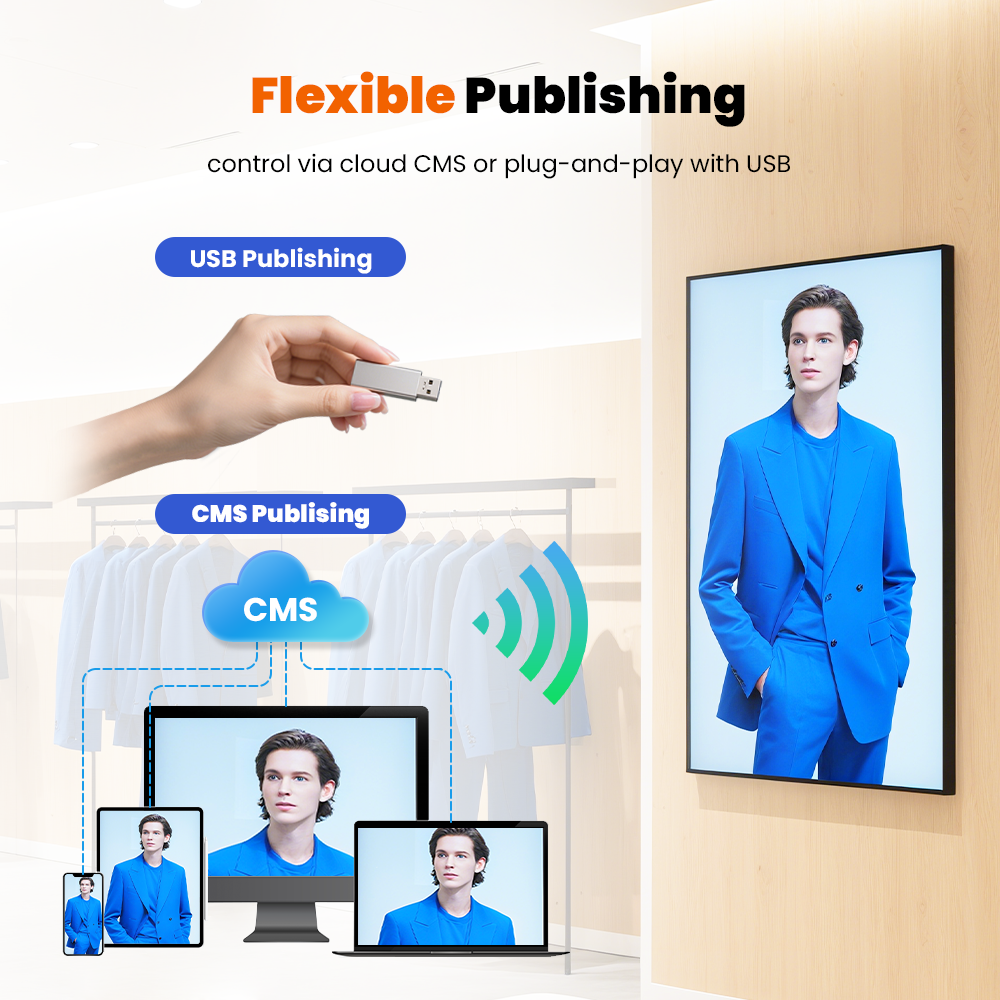
| スタンドアロンの広告プレーヤー | USBドライブまたはSDカードストレージ | 埋め込みデコーダはオフライン メディア ファイルを処理します | LCD パネルに固定コンテンツが表示される |
| デジタルサイネージシステム | クラウド CMS プラットフォームまたはリモート コンテンツ サーバー | SoC メディア プレーヤーまたはネットワーク プレーヤーが動的コンテンツを管理します | LCD はリアルタイムのコンテンツをリモートで更新します |
スタンドアロンの広告プレーヤーの仕組み
従来の広告プレーヤーは、USB ドライブや SD カードなどのローカル ストレージ デバイスを使用します。. 内蔵デコーダは、LCD パネルに信号を送信する前に、保存されたビデオと画像を読み取ります。.
このアーキテクチャは、シンプルな再生ソリューションを提供します. しかし, コンテンツを手動で更新する必要があり、提供される対話機能は限られています.
デジタル サイネージ システムの仕組み
デジタル サイネージ プラットフォームは、クラウド CMS ソフトウェアとネットワーク対応メディア プレーヤーを接続します。. システムは、IP ネットワークまたは Wi-Fi 接続を通じてコンテンツを配信します。.
内蔵 SoC メディア プレーヤーはマルチメディア コンテンツを処理し、LCD を制御します。. 加えて, 統合されたセンサーとタッチ機能により、インタラクティブなエクスペリエンスとリアルタイムのコンテンツ調整が可能になります.
デジタル サイネージの主なアーキテクチャの利点
デジタル サイネージ システムは一元的なコンテンツ管理を提供します, リモートアップデート, 柔軟な表示制御. したがって, 企業は、さまざまな場所にまたがる複数の画面を効率的に管理できます.
クラウドCMSを組み合わせることで, ネットワーク接続, インテリジェントなメディア処理, インタラクティブな機能, デジタル サイネージは、小売店にとってよりスケーラブルなソリューションを提供します, 交通拠点, 企業スペース, および公共環境.
動的な対話性とターゲットを絞った配信
最新のデジタル サイネージ プラットフォームはループ再生を超えています. インタラクティブなタッチフォイルを統合することで, モーションセンサー, カメラベースの視聴者測定, および動的 API フィード (ライブ天気など, フライトデータ, またはPOS在庫データベース), デジタル サイネージ システムは、視聴者の人口統計に基づいて表示メディアを動的に調整します, 時刻, または環境トリガー.
一元的なリモート管理とテレメトリ
スタンドアロンの広告表示プレーヤーは、USB ドライブまたは基本的なローカル ネットワーク アップロードによる手動コンテンツ更新に依存します。, デジタル サイネージ プラットフォームにより、管理者は単一のダッシュボードから世界中の数千のディスプレイを管理できるようになります. 一元化されたソフトウェア機能には、リアルタイムの画面健全性モニタリングが含まれます, リモートファームウェアアップデート (太田), パフォーマンスを証明するための自動再生ログ, マルチゾーン画面レイアウト.
3. 比較: スタンドアロン ディスプレイ プレーヤー vs. 統合デジタルサイネージネットワーク
以下の表は、コアエンジニアリング指標全体にわたって、従来のスタンドアロン型広告ディスプレイプレーヤーユニットと、統合されたネットワーク管理型デジタルサイネージシステムを対比しています。:
| 建築 & 運用指標 | スタンドアロンの広告ディスプレイ プレーヤー | ネットワーク型デジタルサイネージシステム |
| 主なエンジニアリングの焦点 | 端末ハードウェア & ローカルメディアの再生 | エンドツーエンドのソフトウェア, ハードウェア, & ネットワークプラットフォーム |
| コンテンツの更新方法 | 手動 USB/SD プラグ アンド プレイまたは基本的なローカル LAN | クラウドベースの CMS または IP/4G/5G 経由のリモート サーバー |
| システムインテリジェンス & 交流 | 固定ビデオ/画像ループ再生 | 動的トリガー, タッチインタラクション, & API統合 |
| デバイステレメトリ & 監視 | なし、またはローカル LED ステータス インジケーター | リアルタイムのリモート診断, テレメトリー, & ログ |
| ネットワークのスケーラビリティ | 低い; 複数の場所への展開には労働集約的 | 高い; シームレスな管理 1,000+ リモート画面 |
| 主なアプリケーションの使用例 | 小規模小売店, 基本的なエレベーター広告, ロビーループ | 複数拠点の小売店チェーン, 空港, とスマートシティネットワーク |
4. B2B 調達における実際的な違い
商業調達中, 最新の商用ハードウェアは両方の動作モードをサポートしているため、広告表示プレーヤーとデジタル サイネージ システムの間の境界があいまいになることがよくあります。.
ハードウェア中心の調達で十分な場合
プロジェクトにローカル インストールが含まれる場合 (単一店舗のウィンドウ ディスプレイなど), 建物のエレベーターのスクリーン, または基本的なロビー情報ボード - 購入者が主に注目できるのは、 広告ディスプレイプレーヤーのハードウェア仕様:
-
市販パネルの明るさ (例えば, 500–2,500ニット)
-
稼働時間定格 (16/7 対. 24/7 連続運転)
-
機械的筐体の定格 (例えば, 屋外キオスク向け IP65 防水)
-
基本的な SoC デコーダのパフォーマンス (Android または Linux ベースのメディア ボード)
システム中心の調達が不可欠な場合
全国規模の小売店チェーンなど、大規模なエンタープライズ環境全体にディスプレイを導入する場合, クイックサービスのレストラン (QSR) デジタルメニューボード, または交通ハブ — 調達は次のようなものに大きくシフトしています。 デジタル サイネージ統合機能:
-
CMS ソフトウェアの互換性 (例えば, ナボリ, スカラ座, ブライトサイン, またはカスタム REST API)
-
ネットワークセキュリティプロトコル (SSL/TLS暗号化, 802.1X認証, エンタープライズファイアウォールコンプライアンス)
-
マルチスクリーンアレイ間でのコンテンツの自動同期
-
高度な分析とハードウェア パフォーマンスの監視
5. 商用ディスプレイ購入者向けの調達ガイドライン
商用 AV インテグレーターと調達ディレクターは、3 つの主要な調達ガイドラインに従うことで、導入効率を最大限に高め、システムの寿命を延ばすことができます。:
-
オープン アーキテクチャと OS の互換性を確認する: 市販の LCD 端末がオープン Android を搭載していることを確認する, Linux, または Windows ベースのシステムオンチップ (SoC) アーキテクチャ. オープン ハードウェア プラットフォームにより、外部のメディア プレーヤー ボックスを必要とせずに、サードパーティのデジタル サイネージ CMS アプリケーションをシームレスにインストールできます。.
-
商用グレードのパネルハードウェアを指定する: 消費者向けテレビと商用広告ディスプレイ プレーヤーを区別する. IPS パネルの定格を主張する 24/7 連続運転, アンチグレアガラスコーティングを採用, 広い視野角 (178°/178°), 直射日光によるパネルの黒化を防ぐ熱管理システム.
-
総所有コストの評価 (TCO): 両方のハードウェア資本支出を評価する (設備投資) 長期的な CMS ライセンスまたは保守運用コスト (運用コスト). リモート テレメトリを備えた信頼性の高い商用ディスプレイを導入すると、5 年間の運用ライフサイクルにわたって高価なサイト訪問サービス コールが削減されます。.
技術概要
これらの用語はしばしば同じ意味で使用されますが、, の 広告表示プレーヤー 物理的な商用端末ハードウェアを表します, 一方 デジタルサイネージ ディスプレイエンドポイントを組み合わせた完全な統合ソリューションを定義します, メディアプレーヤー, ネットワークインフラストラクチャ, およびCMSソフトウェア. 基本的なローカライズされた再生用, 高品質の表示端末を指定するだけで十分です; 企業規模の商用ネットワーク向け, CMS管理を優先する, ネットワークセキュリティ, 動的なコンテンツの統合により、長期的な運用の成功が保証されます。.
Oplux は商用 LCD 広告ディスプレイを設計および供給します, 高輝度屋外キオスク, 世界的な商用 AV 規格を満たすように設計されたインタラクティブ デジタル サイネージ端末.